Immortals of Aveum plays like a fast first-person shooter, but Jak's arsenal is built from magic rather than firearms. His three Strike colors function like distinct weapon classes, while Control spells manipulate enemies, Fury spells deliver heavy attacks, Blink provides evasive movement and Shield absorbs incoming fire.
The default controller layout keeps Jak's primary magic on the triggers. R2 fires the active Strike spell, L2 casts the selected Control spell, R1 opens the Fury Spellbook and L1 raises the Shield. The face buttons handle movement abilities, interaction, reloading and switching between red, blue and green magic.
Several commands gain additional functions as the story progresses. Cross begins as Jump and later supports Hover, Square handles interaction as well as reloading and Mana Crystals, while the right stick controls the camera and performs a melee strike when clicked.
Immortals of Aveum Controls
| Action | PlayStation 5 | Xbox Series | PC Default |
|---|---|---|---|
| Move | Left Stick | Left Stick | W / A / S / D |
| Sprint | Press Left Stick while moving | Press Left Stick while moving | Left Shift |
| Look Around | Right Stick | Right Stick | Mouse |
| Melee Attack | Press R3 | Press Right Stick | V |
| Fire Strike Spell | R2 | RT | Left Mouse Button |
| Fire Selected Control Spell | L2 | LT | Right Mouse Button |
| Raise Shield | L1 | LB | Tab |
| Open Fury Spellbook | R1 | RB | Number Keys 1–6 |
| Cast Selected Fury Spell | R1 + Displayed Face Button | RB + Displayed Face Button | Assigned Fury Key |
| Cycle Strike Spells / Magic Color | Triangle | Y | Mouse Wheel Up / E |
| Cycle Control Spells | D-Pad Up / Left / Down | D-Pad Up / Left / Down | Mouse Wheel Down / Q |
| Select Lash | D-Pad Up | D-Pad Up | Cycle Control Spells |
| Select Disrupt | D-Pad Left | D-Pad Left | Cycle Control Spells |
| Select Limpets | D-Pad Down | D-Pad Down | Cycle Control Spells |
| Jump | Cross | A | Space |
| Hover | Hold Cross while airborne | Hold A while airborne | Hold Space while airborne |
| Blink / Dodge | Circle | B | Left Ctrl |
| Reload Strike Spell | Square | X | R |
| Interact | Square | X | F |
| Use Mana Crystal | Square when prompted / Contextual | X when prompted / Contextual | X |
| Use Health Crystal | D-Pad Right | D-Pad Right | C |
| Cast Dominion / Immolate | Press L3 + R3 | Press LS + RS | Z |
| Grapple | Contextual Control Spell Input | Contextual Control Spell Input | Displayed Contextual Input |
| Open Game Menu | Touch Pad | View | Journal J / Gear G / Talents T |
| Open Map | Game Menu | Game Menu | M |
| Pause Menu | Options | Menu | Esc |
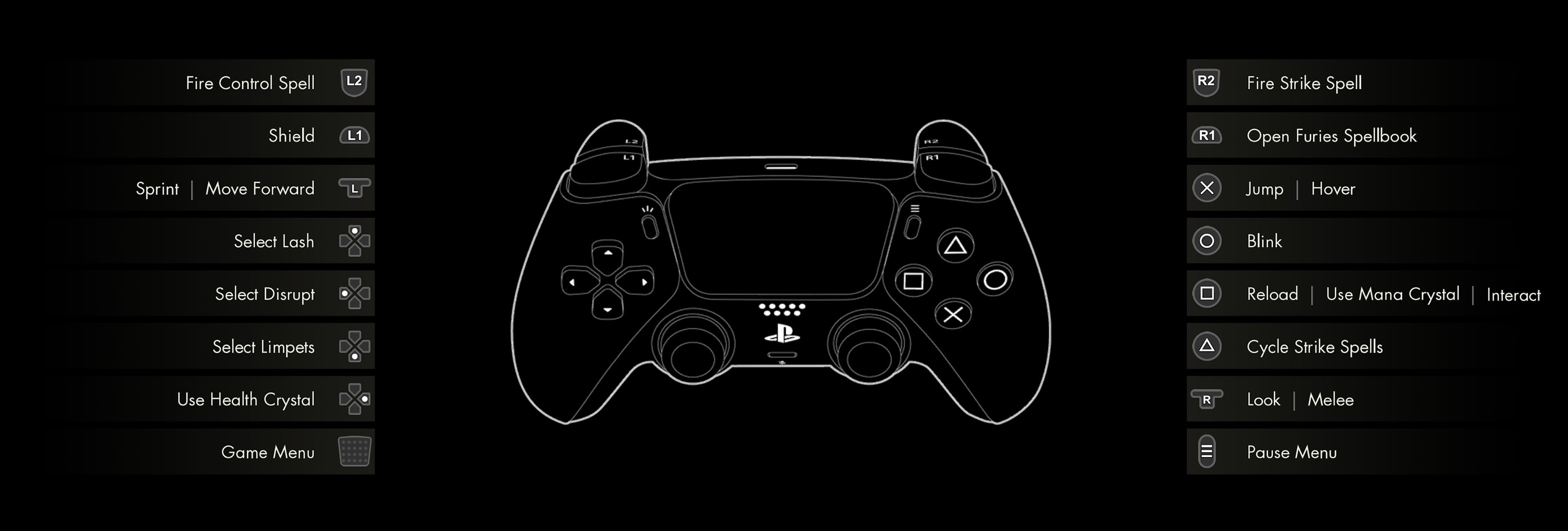
Control note: The same button may perform different contextual actions. Square or Xbox X can reload, interact or use a Mana Crystal depending on Jak's current state. Abilities such as Hover and Grapple become available through story progression.
How Strike Spells Work
Strike spells are Jak's primary attacks. He can equip one red, one blue and one green sigil, then cycle between them instantly during combat.
Think of the three colors as magical weapon classes rather than elemental weaknesses alone:
- Blue Magic: Accurate, long-range force magic suited to critical hits and distant weak points.
- Red Magic: Powerful close-range chaos magic that behaves like a shotgun or explosive cannon.
- Green Magic: Fast life-magic projectiles suited to mobile, sustained fire.
Press Triangle or Xbox Y to cycle between the equipped Strike colors. PC players can use the mouse wheel or E.
Blue Strike Spells
Blue sigils provide the cleanest long-range accuracy. They are useful against distant spellcasters, exposed crystals and enemies with small weak points.
Blue magic generally rewards deliberate shots rather than continuous firing. Stop moving briefly when precision matters and aim at the highlighted vulnerable area.
Red Strike Spells
Red sigils are strongest at close range. Several red attacks lose effectiveness as the target moves farther away, so Blink toward an opening before firing.
Red magic is particularly effective when several enemies occupy the same narrow area or when a fast attacker reaches Jak's Shield.
Green Strike Spells
Green sigils fire rapidly and frequently guide their projectiles toward targets. This makes green magic comfortable while moving, hovering or circling a large enemy.
Green attacks are excellent for maintaining pressure, but long bursts can empty the sigil's magazine quickly. Reload during natural pauses instead of waiting for the spell to stop firing during an emergency.
Matching Magic to Enemy Shields
Enemies can be protected by red, blue or green magical defenses. Match the color of the Strike spell to the shield surrounding the target.
- Use blue magic against blue protection.
- Use red magic against red protection.
- Use green magic against green protection.
The matching color strips the defense substantially faster. Continuing to fire the wrong magic wastes time and exposes Jak to additional attacks.
Shield-Breaking Habit
Identify the enemy's shield color before opening fire, switch with Triangle or Y, break the protection and then change to whichever Strike spell deals the best health damage at the current range.
Reloading Magic
Sigils do not consume collectible ammunition, but they still have a magazine or charge capacity. Press Square, Xbox X or R on PC to reload the active Strike spell.
Different sigils have different capacities and reload speeds. A powerful red sigil may deliver enormous damage but require frequent reloads, while a green sigil may support longer bursts.
Reload while moving behind cover, after using Blink or while Shield absorbs incoming projectiles. Avoid beginning a difficult encounter with a partially empty sigil.
Control Spells
Control spells are independent off-hand abilities used to manipulate enemies rather than simply damage them. Select one with the D-Pad and fire it with L2 or LT.
Because Control spells operate independently of the equipped Strike color, Jak can slow, pull or stun a target while continuing to attack with another form of magic.
Lash
Lash pulls compatible enemies toward Jak or grapples Jak toward selected anchors and heavier targets.
In combat, use Lash to:
- Pull a weak ranged enemy out of cover.
- Bring an isolated target into red-magic range.
- Interrupt an enemy's position.
- Cross a gap toward a grapple point.
- Move rapidly toward selected large enemies.
Do not pull a dangerous melee enemy directly toward Jak unless Shield, Blink or a close-range red spell is ready.
Disrupt
Disrupt fires a focused beam that can interrupt or stun enemies. It is especially helpful against large targets preparing powerful attacks.
Hold the beam on the target long enough to trigger the disruption. Use the opening to reload, recover Shield, reposition or fire a Fury spell.
Limpets
Limpets attach to targets and slow their movement. They are ideal against charging enemies and opponents whose speed makes precise blue-magic shots difficult.
Control spells can be layered into combinations. Attach Limpets, continue firing Strikes and use the slowed movement to line up weak-point damage.
Fury Spells
Fury spells are powerful heavy attacks that consume Fury Mana. Hold or press R1 or RB to open the Fury Spellbook, then select the desired spell with the displayed face-button command.
Unlike Strike spells, Furies cannot be cast indefinitely. Once the mana segments are empty, use a Mana Crystal or collect a replenishment.
Shatter
Shatter uses blue magic to send a damaging eruption along the ground. It is effective against enemies positioned in front of Jak and can hit targets that are difficult to reach with direct fire.
Blastwave
Blastwave releases an explosive red wave around Jak. Use it when surrounded or when several enemies push through the Shield at once.
Torrent
Torrent releases green homing projectiles. It is useful against moving targets and during encounters where precise manual tracking is difficult.
When to Spend Fury Mana
- When several enemies can be hit together.
- When a strong opponent exposes a weak point.
- When an enemy formation is about to overwhelm Shield.
- When a Fury can interrupt a dangerous attack.
- When a Mana Crystal is available nearby.
Do not finish an encounter with every mana segment unused merely because you were waiting for a theoretically perfect target.
Using Mana Crystals
Mana Crystals restore Fury Mana. The console command shares Square or Xbox X contextually, while the default PC key is X.
Create room before using one. Blink behind cover, deploy Shield or stun the largest threat with Disrupt first.
Mana Crystals are commonly found through exploration, breakable objects and defeated enemies. Use Fury spells regularly, but keep one crystal available before a boss or difficult Shroudfane.
Shield Controls
Hold L1, LB or Tab to raise Jak's magical Shield. It absorbs a limited amount of incoming damage before breaking and then requires time to recover.
Shield allows Jak to attack while protected, making it useful for:
- Trading shots with ranged enemies.
- Reloading under pressure.
- Reviving a damaged combat rhythm.
- Studying an unfamiliar projectile pattern.
- Holding position while firing Disrupt.
Do not treat Shield as permanent cover. Watch its strength and use Blink before it collapses.
Perfect Block
The Perfect Block talent adds a parry-like reward for raising Shield at the correct moment. Instead of holding L1 throughout the entire exchange, activate it just before the attack arrives.
Practise against slow, visible projectiles before attempting Perfect Blocks against rapid groups.
Blink
Press Circle, Xbox B or Left Ctrl to Blink. Blink is a fast magical dodge used to escape attacks, reposition and cross dangerous spaces.
It is more effective when used in response to an incoming hit rather than activated repeatedly without reading the battlefield.
Blink Charges and Cooldown
Gear and talents can add Blink charges or reduce its recovery time. These bonuses are valuable for highly mobile green-magic builds and difficult optional encounters.
Avoid spending every available charge merely to move faster. Keep one ready for an enemy lunge, explosion or projectile volley.
Best Blink Directions
- Blink sideways around linear projectiles.
- Blink behind close-range enemies when possible.
- Blink away from large ground effects.
- Blink toward cover before reloading.
- Blink toward red-magic range only after the enemy commits to an attack.
Jumping and Hovering
Press Cross, Xbox A or Space to jump. Hold the same button while airborne after Hover is unlocked to slow Jak's fall and remain above the battlefield.
Hover is useful for:
- Crossing long gaps.
- Avoiding ground attacks.
- Firing over low cover.
- Finding elevated routes and hidden chests.
- Maintaining sight of enemies on different levels.
Remaining airborne also makes Jak easier for ranged enemies to track. Blink or end the Hover when several projectiles converge.
Melee Attack
Press R3, the right stick or V on PC to perform a magical melee strike.
Melee is useful for finishing weakened enemies, creating space and saving time when a nearby target has almost no health remaining.
Do not rush into a healthy armored enemy solely to use melee. Red magic and Blastwave provide safer close-range power.
Dominion and Immolate
Press both thumbsticks simultaneously on a controller or Z on PC to cast Dominion once the meter is full.
Jak's Dominion spell, Immolate, channels all three magic colors into a devastating beam. The meter builds through combat, damage and defeating enemies.
Use Dominion against:
- Bosses during a stable opening.
- Several elites aligned in one direction.
- An enemy whose defense is difficult to break normally.
- A final dangerous wave.
- An emergency where ordinary spells cannot regain control.
Aim before activating. The beam is powerful, but wasting its duration while turning toward the target reduces its value.
Interacting and Solving Puzzles
Press Square, Xbox X or F near an interactive object. The command operates doors, mechanisms, levers, chests, Forge stations and story objects.
Many puzzles also require magic colors or Augment spells. Look for:
- Colored crystals that respond to matching Strike magic.
- Lash anchors.
- Objects moved by green, red or blue mechanisms.
- Hidden switches visible from another angle.
- Routes accessible after Hover or Grapple is unlocked.
When a puzzle appears impossible, it may require an ability earned later. Mark the location mentally and return through fast travel.
Menus, Gear and Talents
The game menu contains Gear, Talents, Journal and Map sections. PC also provides direct shortcuts such as G for Gear, T for Talents, J for Journal and M for Map.
Gear Menu
Equip one sigil for each magic color, plus rings, bracers and totems. Compare more than the main power number. Capacity, reload speed, cooldown, Shield strength and Fury bonuses can substantially change a build.
Talent Trees
Jak has separate red, blue and green talent trees. Talents can improve Strike spells, Shield, Blink, Control spells, Furies and color-specific effects.
Talents can be respecced outside combat, so experimenting does not permanently ruin the character.
Recommended Controller Settings
Lower Horizontal Sensitivity if Targeting Feels Loose
The game contains many small weak points and distant blue-magic shots. Reduce look sensitivity when the reticle repeatedly passes the intended target.
Keep Blink on a Face Button
Blink must be available instantly while both triggers remain occupied by Strike and Control magic. Circle or Xbox B is a sensible default.
Keep Shield on a Shoulder Button
L1 or LB allows Jak to defend while the right thumb continues aiming.
Reduce Vibration During Long Combat Sessions
Frequent spell impacts can produce continuous feedback. Lower vibration when it becomes distracting or tiring.
Adjust Aim Assistance Rather Than Avoiding Blue Magic
Blue spells are valuable against distant weak points. Increasing aim assistance or reducing sensitivity is better than abandoning an entire combat color.
Frequently Asked Questions
What are the default PlayStation controls?
R2 fires Strike magic, L2 casts the selected Control spell, R1 opens the Fury Spellbook, L1 raises Shield, Cross jumps or hovers, Circle Blinks, Square reloads or interacts, Triangle cycles Strike colors and R3 performs melee.
How do you switch magic colors?
Press Triangle on PlayStation, Y on Xbox or use the mouse wheel or E on PC.
Which magic color is best?
Blue is strongest for range and precision, red for close-range power and green for rapid mobile attacks. Effective players switch according to distance, shield color and enemy type.
How do you break colored shields?
Attack the shield with the matching magic color.
How do you reload magic?
Press Square, Xbox X or R. Sigils reload rather than consuming conventional ammunition.
How do you use Lash?
Select Lash with D-Pad Up, then press L2 or LT while targeting a compatible enemy or grapple point.
How do you use Disrupt?
Select Disrupt with D-Pad Left, hold the Control Spell trigger and keep the beam on the target until it staggers.
How do Limpets work?
Select Limpets with D-Pad Down and fire them at an enemy to slow its movement.
How do you cast Fury spells?
Open the Fury Spellbook with R1 or RB and press the displayed button for the desired spell. Fury spells consume mana.
How do you restore Fury Mana?
Use a Mana Crystal or collect mana dropped from enemies and breakable objects.
How do you heal?
Press D-Pad Right on a controller or C on PC to consume a Health Crystal.
How do you use Shield?
Hold L1, LB or Tab. The Shield absorbs a limited amount of damage before needing to recover.
How do you dodge?
Press Circle, Xbox B or Left Ctrl to Blink.
How do you Hover?
After unlocking Hover, hold Jump while airborne.
How do you use the ultimate spell?
Press L3 and R3 together on a controller or Z on PC when the Dominion meter is full.
Can talents be reset?
Yes. Jak can respec his talents outside combat.
Do Strike spells use ammunition?
No conventional ammunition is required, but sigils have limited capacity and must be reloaded.
Can controls be remapped?
PC input bindings can be customized. Console players can adjust available control and accessibility settings or use platform-level button reassignment.
Why can I not open a route or chest?
It may require a later Augment spell such as Hover or Grapple, a specific magic color or another story ability.
What is the best beginner setup?
Keep a precise blue sigil, a reliable close-range red sigil and a forgiving green rapid-fire sigil equipped. Use Limpets for fast enemies and Disrupt against large threats.
Final Control Advice
Immortals of Aveum becomes much easier once the controls stop feeling like separate spell buttons and begin working as one combat loop. Match the shield color, slow or stun the target with a Control spell, fire the Strike suited to the distance and spend Fury when the opening is large enough.
Keep Shield and Blink available, reload before entering the next group and do not save Dominion until after the danger has passed. Jak is strongest when every part of his magical toolkit is used together.
Continue with our Immortals of Aveum Tips and Tricks Guide for spell combinations, sigils, talents, gear, exploration, Shroudfanes, bosses and endgame challenges.
Comments
No comments yet. Be the first to share your thoughts!