Echoes of the End combines deliberate sword fighting, evasive movement, Vestige magic, companion commands and environmental puzzle-solving. Its control scheme reflects that mixture: the right shoulder buttons handle attacks, L1 controls blocking and parrying, L2 prepares Ryn's magical powers, and the face buttons cover jumping, dodging, interacting and companion abilities.
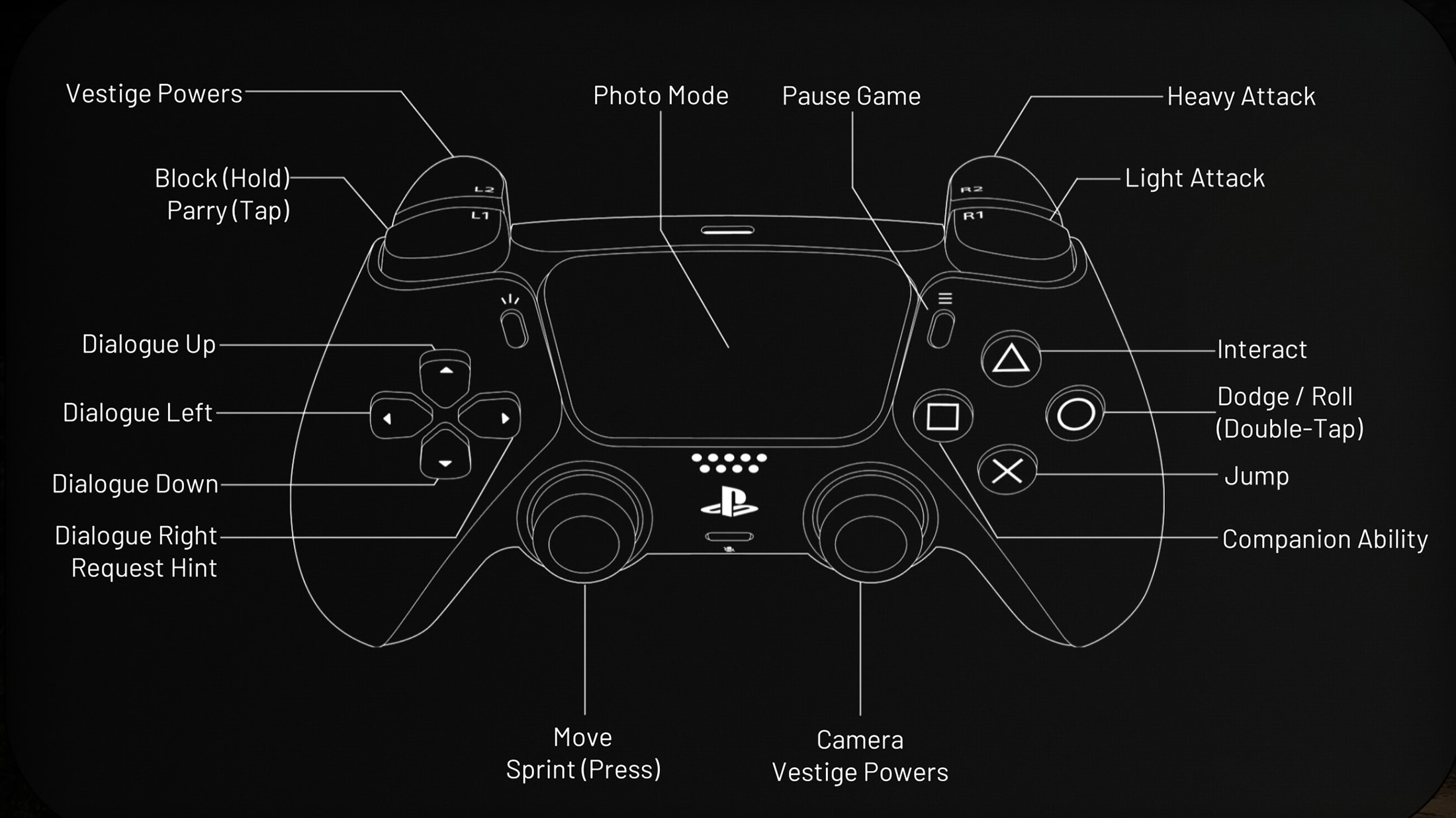
The attached in-game controller diagram confirms the default PlayStation 5 layout. Some commands are contextual, while Vestige and companion actions expand as new abilities are unlocked during the story.
This guide covers the confirmed PlayStation controls, their Xbox equivalents, PC input guidance, combat inputs, dialogue choices, Vestige Powers, companion abilities, Photo Mode and important control settings.
Echoes of the End Controls
| Action | PlayStation 5 | Xbox Series X|S | PC |
|---|---|---|---|
| Move Ryn | Left Stick | Left Stick | Movement Keys |
| Sprint | Press L3 | Press Left Stick | Assigned Sprint Key |
| Move Camera | Right Stick | Right Stick | Mouse |
| Use Contextual Vestige Power | Right Stick / Displayed Vestige Input | Right Stick / Displayed Vestige Input | Assigned Vestige Input |
| Jump | Cross | A | Assigned Jump Key |
| Dodge | Circle | B | Assigned Dodge Key |
| Roll | Double-Tap Circle | Double-Tap B | Double-Tap Assigned Dodge Key |
| Interact | Triangle | Y | Assigned Interact Key |
| Companion Ability | Square | X | Assigned Companion Ability Key |
| Light Attack | R1 | RB | Assigned Light Attack Input |
| Heavy Attack | R2 | RT | Assigned Heavy Attack Input |
| Parry | Tap L1 | Tap LB | Tap Assigned Block / Parry Input |
| Block | Hold L1 | Hold LB | Hold Assigned Block / Parry Input |
| Prepare Vestige Powers | L2 | LT | Assigned Vestige Powers Input |
| Use Offensive Vestige Power | Hold L2 + Displayed Attack Input | Hold LT + Displayed Attack Input | Vestige Modifier + Assigned Power Input |
| Manipulate a Valid Object | Hold L2 + Aim / Displayed Input | Hold LT + Aim / Displayed Input | Vestige Modifier + Aim / Power Input |
| Dialogue Choice: Up | D-Pad Up | D-Pad Up | Displayed Dialogue Key |
| Dialogue Choice: Left | D-Pad Left | D-Pad Left | Displayed Dialogue Key |
| Dialogue Choice: Down | D-Pad Down | D-Pad Down | Displayed Dialogue Key |
| Dialogue Choice: Right | D-Pad Right | D-Pad Right | Displayed Dialogue Key |
| Request Puzzle Hint | D-Pad Right when Prompted | D-Pad Right when Prompted | Assigned Request Hint Key |
| Open Photo Mode | Touch Pad | View Button | Assigned Photo Mode Key |
| Pause Game | Options | Menu Button | Esc |
PC note: The PC version supports keyboard and mouse as well as compatible controllers. Exact keyboard bindings can differ after rebinding or an update, so check the in-game Controls menu for the active key assigned to each action.
How the Control Scheme Works
The layout separates Ryn's physical combat from her supernatural abilities. R1 and R2 perform sword attacks, while L1 handles defence. L2 acts as the main Vestige Power modifier, changing the function of other inputs when Ryn is targeting a compatible enemy, object or environmental mechanism.
The four face buttons cover the actions needed most frequently during exploration:
- Cross / A: Jump.
- Circle / B: Dodge or perform a longer roll when double-tapped.
- Triangle / Y: Interact with objects, mechanisms and story elements.
- Square / X: Activate the currently available companion ability.
Because several actions are contextual, always read the displayed prompt when standing near an object, puzzle device, ledge or companion interaction point.
Movement and Sprinting
Use the left stick to move Ryn and press L3 to sprint. Sprinting is useful during exploration, escapes and certain traversal sequences, but it should not replace controlled movement during platforming.
Slow down before:
- Narrow beams.
- Broken ledges.
- Moving puzzle platforms.
- Climbing transitions.
- Areas containing hidden drops.
- Approaching an interaction prompt.
Release Sprint Before Precise Jumps
High speed can make Ryn overshoot a small landing area. Approach the edge under control, align the camera with the destination and then jump.
Use Sprint to Create Combat Distance
When a battle becomes crowded, sprinting away from the centre can create enough space to reposition the camera, identify ranged enemies and prepare a Vestige ability.
Camera Controls
Move the right stick or mouse to control the camera. Camera positioning matters during combat because attacks may arrive from outside the immediate field of view.
Before entering a fight, use the camera to identify:
- Ranged enemies.
- Explosive or movable environmental objects.
- Cliffs and hazards.
- Available space for dodging.
- The position of Ryn's companion.
Keep Enemies in Front of Ryn
Avoid allowing a group to surround you. Move toward the outer edge of the battle and rotate the camera so that most threats remain visible.
Reset the Camera Before Platforming
An angled camera can make a straightforward jump appear shorter or longer than it really is. Centre the destination before committing.
Jump Controls
Press Cross or A to jump. The command is used during ordinary traversal, climbing sequences and environmental puzzles.
Ryn may automatically grab or mantle onto valid surfaces when the jump reaches the correct position. A failed grab often means the angle was wrong rather than the destination being completely inaccessible.
Look for Visual Route Markers
Climbable edges, beams, ropes and environmental shapes are usually arranged to guide progression. If a jump appears unreasonably long, search for another ledge or a Vestige interaction first.
Do Not Fight the Traversal Camera
During narrow climbing sequences, use small directional inputs. Sudden camera rotation combined with full movement can send Ryn toward the wrong side of a ledge.
Dodge and Roll Controls
Tap Circle or B to dodge. Double-tap the button to perform a longer roll.
The short dodge is best for avoiding a specific attack while remaining close enough to retaliate. The roll covers more distance and is better for escaping an area attack, leaving a group or closing the gap to a ranged enemy.
Use a Single Dodge for Precise Evasion
A short dodge normally provides better positioning when fighting one opponent. Rolling too far can move Ryn outside attack range or place her beside another enemy.
Use the Roll to Reset the Fight
Double-tap Circle or B when:
- Several enemies are attacking together.
- A large area effect is about to land.
- Ryn is trapped against scenery.
- You need distance to prepare a Vestige Power.
- A ranged opponent is controlling the battlefield.
Dodge Direction Matters
Rolling directly backward may leave Ryn inside the path of a long-reaching attack. Moving diagonally or around the enemy can create a safer angle.
Light Attack Controls
Press R1 or RB to perform a Light Attack. Light attacks are quicker than heavy strikes and are useful for maintaining pressure, interrupting vulnerable enemies and finishing short combinations.
Use Light Attacks when:
- An enemy has just missed an attack.
- A parry creates a brief opening.
- You need a fast strike before dodging.
- An opponent has very little health remaining.
- A companion ability has staggered the target.
Avoid Repeating the Full Combo Automatically
Watch the enemy instead of committing to every available swing. Stop attacking when the opponent begins an armoured or unblockable response.
Heavy Attack Controls
Press R2 or RT to perform a Heavy Attack. Heavy strikes deal greater impact and are useful against staggered, guarded or durable targets.
Heavy attacks normally require more commitment than Light Attacks. Use them after creating a safe opening rather than beginning every encounter with one.
Reliable Heavy Attack Openings
- Immediately after a successful parry.
- After a companion ability staggers the enemy.
- When an opponent completes a slow missed attack.
- After a Vestige Power interrupts or displaces the target.
- When attacking an enemy focused on another threat.
Do Not Trade Damage Unnecessarily
A Heavy Attack may still land if Ryn is struck during its animation, but exchanging health is rarely worthwhile. Cancel the plan and defend when the opening disappears.
Blocking
Hold L1 or LB to block incoming attacks. Blocking is the safer defensive option when the timing of an enemy's strike is unfamiliar.
Use block while learning:
- A new enemy's combo.
- A boss's delayed attacks.
- The reach of a large weapon.
- Which strikes arrive in quick succession.
Do Not Hold Block Forever
Blocking should create time to understand the attack pattern. Once the sequence ends, release the button and reposition or retaliate.
Some Threats Require Movement
Large area attacks, environmental hazards and attacks signalled as unblockable should be avoided with a dodge or roll instead of relying on L1.
Parrying
Tap L1 or LB shortly before an enemy's attack connects to parry it. A successful parry creates a stronger counterattack opportunity than ordinary blocking.
Watch the Weapon, Not Only the Enemy
Large opponents may begin an animation well before the actual impact. Time the parry to the weapon's final movement toward Ryn rather than the first wind-up.
Learn with Block First
Hold L1 during an unfamiliar combo, observe when each hit lands and attempt the parry during the next repetition.
Parry Is Not Always the Best Defence
Use dodge instead when:
- Several enemies are attacking from different directions.
- The attack covers a large area.
- The enemy uses a delayed strike that repeatedly disrupts your timing.
- A ranged projectile is arriving at the same moment.
- The attack is clearly presented as unblockable.
Vestige Powers
Hold or press L2 or LT according to the displayed prompt to prepare Ryn's Vestige Powers. These abilities are used in combat, traversal and environmental puzzles.
Depending on the unlocked power and current target, Ryn can manipulate matter, affect enemies, activate ancient mechanisms or alter objects required for progression.
Target Before Activating
Move the camera until the intended enemy or object is clearly highlighted. This reduces the chance of affecting the wrong target during a crowded fight or puzzle.
Use Magic to Control Space
Vestige Powers are especially effective when they:
- Interrupt a dangerous enemy.
- Move an opponent away from Ryn.
- Pull enemies into a useful position.
- Exploit a nearby environmental hazard.
- Create time for a Heavy Attack.
- Separate melee and ranged opponents.
Do Not Treat Every Power as Pure Damage
Repositioning an enemy can be more valuable than dealing immediate damage. Moving a target away from its allies may create a safe one-on-one fight.
Manipulating Objects with Vestige Powers
Many puzzles require Ryn to target a compatible object and use her Vestige ability to shift, reconstruct or reposition it.
A common interaction method is:
- Move the camera over the object until it highlights.
- Hold L2 or LT.
- Choose the required direction or power input.
- Release or confirm the input when the object reaches the correct position.
Inspect the Destination Before Moving the Object
Look for grooves, sockets, matching architecture, energy paths or surfaces that indicate where the object belongs.
Some Objects Are Intermediate Steps
A platform may need to be moved more than once. Use it to reach a new position, then manipulate it again from the opposite side.
Companion Ability
Press Square or X to activate the currently available companion ability. The exact result depends on the companion, the story chapter and the ability currently unlocked.
Companion actions can support combat, exploration and puzzle-solving. A companion may attack or stagger an enemy, interact with a mechanism or hold an object in place while Ryn performs another action.
Use Companion Abilities to Start Combos
A companion stagger can create time for:
- A Heavy Attack.
- A Vestige Power.
- A safe reposition.
- An attack against another enemy.
- Recovery during a difficult fight.
Watch for Companion Prompts in Puzzles
When an environmental mechanism appears impossible to operate alone, look for the companion ability indicator. The solution may require the companion to hold, anchor or activate one element while Ryn manipulates another.
Dialogue Controls
Use the D-Pad to select dialogue responses. The available direction corresponds to the response displayed on screen.
Dialogue choices help shape Ryn's conversations and reveal additional character information. Read every option before pressing a direction, since the layout may change between conversations.
Do Not Assume the Same Tone Is Always in the Same Direction
D-Pad Up is not permanently tied to one personality type or response style. Choose according to the text currently shown.
Requesting a Hint
During supported puzzle sections, D-Pad Right can request a hint when the relevant prompt is available.
Hints are useful when you understand the individual mechanics but cannot determine their required order.
Experiment Before Requesting Help
First identify:
- Every movable object.
- The companion interaction point.
- The intended destination.
- Any Vestige symbols or energy paths.
- Whether the puzzle has multiple stages.
Request the hint after testing the obvious relationships. This preserves the satisfaction of solving the environmental logic while preventing one puzzle from stopping progress entirely.
Interacting with the World
Press Triangle or Y when an interaction prompt appears. This command is used for story objects, puzzle mechanisms, collectibles and environmental actions.
Move Ryn close to the object and face it directly if the prompt does not appear. Some interactions require combat to end or another puzzle element to be placed correctly first.
Check Both Sides of a Mechanism
An object that appears inactive from one position may need to be approached from the front, reached from another level or activated by the companion.
Photo Mode Controls
Press the Touch Pad on PlayStation 5 to open Photo Mode. On Xbox, use the View button when the equivalent input is available.
Photo Mode is separate from pausing the game and is designed for composing screenshots of Aema's landscapes, characters and combat effects.
Once Photo Mode is open, follow the displayed interface for camera movement, field of view, focus and visual options.
Open Photo Mode from a Stable Position
Avoid activating it accidentally during a demanding traversal sequence. Pause Ryn on solid ground before composing a shot.
Pause Menu
Press Options on PlayStation or Menu on Xbox to pause the game and access settings, abilities, equipment and other available menus.
Because Echoes of the End uses automatic checkpoint saving rather than manual save slots, the Pause Menu does not provide a traditional save-anywhere command.
Automatic Saving and Checkpoints
Progress is saved automatically at checkpoints distributed throughout the chapters. Watch for the save indicator before leaving the game.
To reduce lost progress:
- Continue a short distance after a difficult fight.
- Wait for the save indicator after completing a puzzle.
- Do not close the game while the saving symbol is active.
- Use Restart Checkpoint only when you are willing to lose progress made since the last checkpoint.
Can You Remap the Controls?
Keyboard bindings may be configurable on PC, and updates have addressed issues involving certain rebound inputs. Controller players should inspect the current Controls menu because the available customization options may differ by platform and game version.
When changing bindings, keep these actions within easy reach:
- Dodge / Roll.
- Block / Parry.
- Light Attack.
- Vestige Powers.
- Companion Ability.
Test Tap and Hold Functions
L1 performs two defensive actions: tap to parry and hold to block. Any replacement binding must remain comfortable for both a quick press and a sustained hold.
Keep Dodge Separate from Interaction
Combat frequently takes place near puzzle objects and scenery. Distinct inputs reduce accidental interactions during a fight.
Recommended Controller Settings
Camera Sensitivity
Use a sensitivity high enough to follow enemies moving around Ryn but low enough for precise object targeting during Vestige puzzles.
Motion Blur
Reduce or disable Motion Blur when rapid dodges make enemies or platform edges difficult to track.
Subtitles
Enable subtitles to follow companion conversations, story dialogue and spoken puzzle hints more easily.
Difficulty
Story difficulty is suitable for players primarily interested in exploration, puzzles and narrative. Balanced offers the intended middle ground, while Challenge increases the pressure of combat and defensive timing.
Frequently Asked Questions
What are the Echoes of the End PS5 controls?
R1 performs Light Attacks, R2 performs Heavy Attacks, L1 blocks or parries, L2 activates Vestige Powers, Cross jumps, Circle dodges, Triangle interacts and Square uses the companion ability.
How do you parry?
Tap L1 or LB shortly before an enemy attack connects.
How do you block?
Hold L1 on PlayStation or LB on Xbox.
How do you roll?
Double-tap Circle on PlayStation or B on Xbox.
How do you sprint?
Press L3 or the left stick while moving.
How do you use Vestige Powers?
Use L2 or LT and the displayed attack, aiming or directional input for the currently selected power or environmental target.
How do you use a companion ability?
Press Square on PlayStation or X on Xbox when the companion ability is available.
How do you request a puzzle hint?
Press D-Pad Right when the Request Hint prompt appears.
How do you choose dialogue options?
Press the D-Pad direction corresponding to the response displayed on screen.
How do you open Photo Mode?
Press the Touch Pad on PlayStation 5.
Does Echoes of the End have manual saving?
No. Progress is recorded automatically at chapter checkpoints.
Can I use a controller on PC?
Yes. The PC version includes full controller support.
Can I change the difficulty?
Yes. Story, Balanced and Challenge difficulty options are available.
Why is an object not responding to L2?
Make sure the object is compatible, correctly highlighted and being targeted from a valid position. Some mechanisms also require a companion action or another puzzle stage first.
Should I block or dodge?
Block while learning ordinary attack timing. Dodge or roll away from unblockable attacks, area effects and situations where several enemies are attacking together.
What is the difference between dodge and roll?
A single press performs a shorter evasive movement, while a double-tap produces a longer roll for escaping larger attacks or creating distance.
What is the best control to master first?
Learn the distinction between tapping L1 to parry and holding it to block. Reliable defence makes every later combat ability easier to use.
Final Control Advice
Echoes of the End becomes much more responsive once its defensive and magical inputs are treated as separate systems. Use R1 for quick pressure, R2 only when a safe Heavy Attack opening appears, tap L1 for a calculated parry and hold it when you need dependable protection.
L2 is the key to Ryn's Vestige abilities, but magic works best when combined with positioning and companion commands. Move enemies into vulnerable locations, use Square or X to create openings and save the longer Circle or B roll for situations where a short dodge will not provide enough distance.
Continue with our Echoes of the End Tips and Tricks Guide for combat strategies, puzzle solutions, Vestige Power advice, gear recommendations and exploration tips.
Comments
No comments yet. Be the first to share your thoughts!