The Ninja Gaiden: Ragebound controls are deliberately compact, but there is far more going on than simply attacking and jumping. Kenji Mozu can cut through enemies with his blade, bounce from threats with Guillotine Boost and combine his skills with Kumori's Kunai and Spider Weapons.
The game becomes much smoother once those actions feel like parts of the same movement system. This guide covers the default PlayStation and PC controls, plus the combat techniques behind Hypercharge, dodging, projectile deflection and Guillotine Boost.
Ninja Gaiden: Ragebound PlayStation Controls
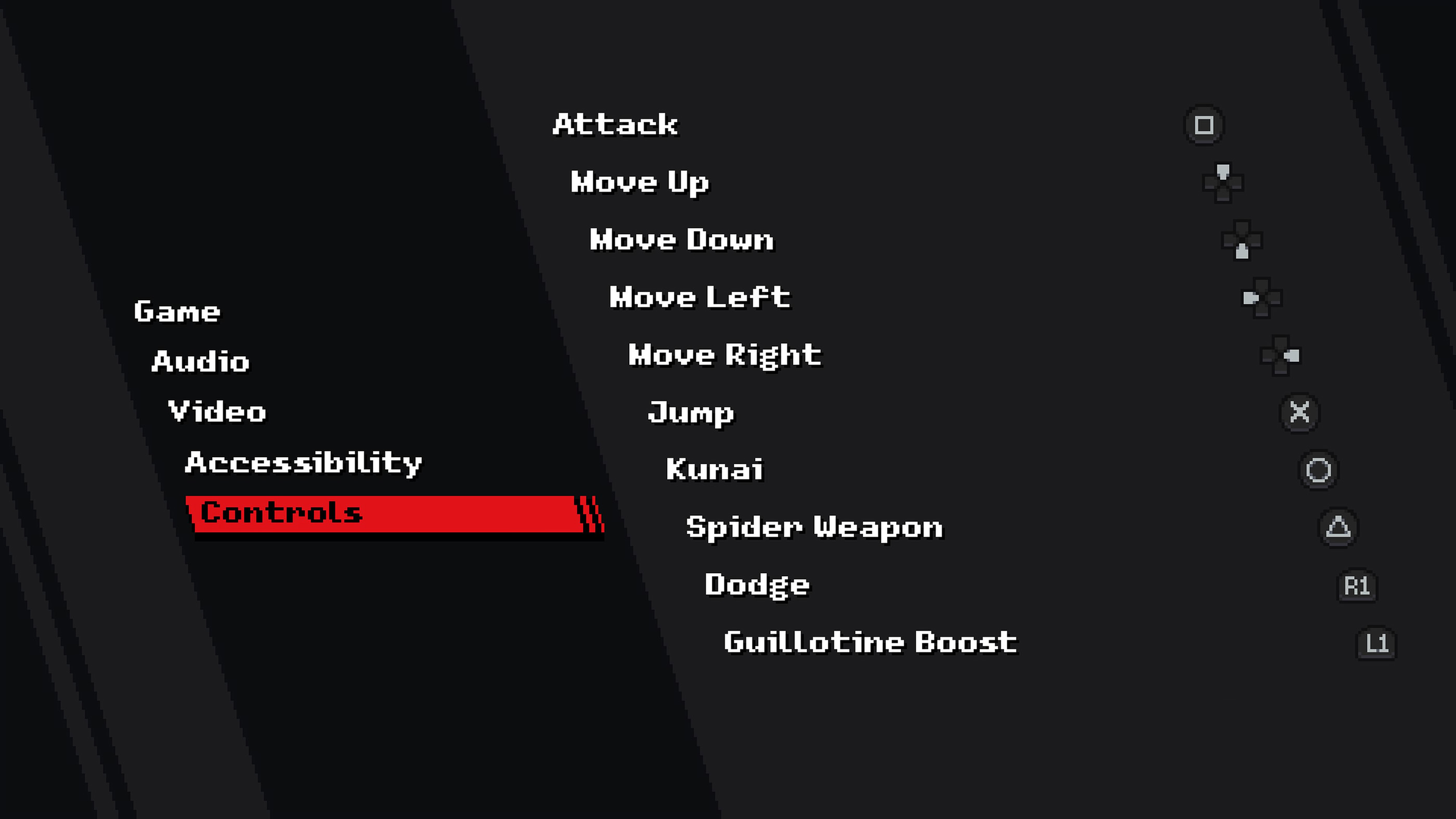
The following layout matches the default PlayStation controls shown in the in game Controls menu.
| Action | PlayStation Control |
|---|---|
| Attack | Square |
| Move Up | D Pad Up |
| Move Down | D Pad Down |
| Move Left | D Pad Left |
| Move Right | D Pad Right |
| Jump | X |
| Kunai | Circle |
| Spider Weapon | Triangle |
| Dodge | R1 |
| Guillotine Boost | L1 |
Movement can also be handled with the directional input supported by your controller setup. The game is built around precise two dimensional movement, so use whichever option gives you the most reliable direction changes.
Ninja Gaiden: Ragebound PC Keyboard Controls
The default keyboard setup keeps the movement keys separate from the cluster used for attacks and special movement.
| Action | PC Control |
|---|---|
| Move Up | W |
| Move Down | S |
| Move Left | A |
| Move Right | D |
| Jump | Space |
| Attack | K |
| Kunai | L |
| Spider Weapon | J |
| Dodge | Left Shift |
| Guillotine Boost | I |
Can You Change the Controls?
Yes. Ninja Gaiden: Ragebound allows its gameplay controls to be reassigned from the Controls section of the Options menu. This is particularly useful for Guillotine Boost because it is an action you will eventually use almost as naturally as jumping.
There is no universally perfect layout. If you repeatedly miss a Boost because reaching its button feels awkward, changing that input can be more useful than trying to force yourself to adapt.
How Attack Works
Kenji's Attack is the foundation of close range combat. Press Square on PlayStation or K on the default keyboard layout to strike with his sword.
The blade is not only for enemies. Ragebound frequently places destructible objects and other interactive targets in stages, so striking suspicious objects can reveal useful opportunities.
How to Deflect Projectiles
Some incoming projectiles can be knocked back with a correctly timed sword attack. This is more than a defensive trick. Certain encounters are designed around sending an enemy's own projectile back toward it, and some stage challenges specifically ask you to perform deflections.
Watch the projectile rather than Kenji. Attack shortly before it reaches him and, once the timing becomes familiar, deflection starts to feel much more reliable.
How Kunai Work
Kumori's Kunai give you a ranged option when a target is awkward or dangerous to approach directly. Press Circle on PlayStation or L with the default keyboard controls.
Do not throw them without thinking. Kumori's abilities interact with the Ki gauge, and Ki is a resource worth managing rather than exhausting on enemies Kenji could easily defeat with his sword.
How Spider Weapons Work
Spider Weapons are Kumori's more specialised offensive tools. The default input is Triangle on PlayStation and J on keyboard.
Their importance becomes especially clear when the game introduces different aura types. A blue aura is associated with Kenji's attacks, while a pink aura can be claimed with Kumori's Spider Weapon. Defeating the correct aura enemy grants Hypercharge.
How Hypercharge Works
Hypercharge lets you deliver an extremely powerful follow up attack. The safest way to earn it is by defeating an aura enemy with the corresponding attack type and then using the charge against a tougher target.
You can also obtain Hypercharge by holding the normal Attack button and sacrificing some health. That is powerful, but deliberately giving up health is a serious trade when you do not yet know what is waiting in the next room.
Hypercharge does not last forever, so once you have earned one, identify the dangerous target and use it deliberately rather than carrying it around until the opportunity disappears.
How Guillotine Boost Works
Guillotine Boost is one of the defining mechanics of Ninja Gaiden: Ragebound. Press L1 on PlayStation or I with the default keyboard controls to perform it.
The technique lets you bounce from enemies and certain hazards or projectiles, giving Kenji additional height and forward momentum while also functioning offensively. Many platforming sections are designed around chaining these interactions without touching the ground.
Do not think of Guillotine Boost as an occasional special attack. It is part of your movement vocabulary.
Guillotine Boost Can Be Used With Jump
There is another useful detail that is easy to overlook: the game also lets you perform the Guillotine Boost interaction through the Jump input when positioned correctly over a compatible target.
Some players find this easier because their thumb is already prepared to jump during platforming. The dedicated Boost button remains useful, so experiment with both methods and use whichever produces cleaner timing.
How Dodge Works
Press R1 on PlayStation or Left Shift on keyboard to dodge. Ragebound rewards aggression, but that does not mean every attack should be challenged head on.
Dodge becomes particularly useful when a crowded screen leaves no clean target for a Guillotine Boost or when a larger enemy begins an attack that you would rather pass through than contest.
What to Practise First
Start by becoming comfortable with Attack, Jump and Guillotine Boost. Then add projectile deflection, Dodge, Kunai and Spider Weapons to the mix.
The goal is not to memorise ten isolated buttons. Ragebound feels best when attacking an enemy, bouncing from the next threat and landing on another platform becomes one continuous motion. Once that rhythm clicks, the controls stop feeling like commands and start feeling like a route through the stage.
Comments
No comments yet. Be the first to share your thoughts!