SAROS uses a fast, aggressive controller layout built around constant movement, quick shooting, and smart defensive timing. You move and aim with the sticks, fire with R2, dash with L1, jump with X, and use L2 for Alt-Fire or the stronger Power Weapon depending on how far you press the trigger. The most important thing to understand early is that SAROS is not just a normal third-person shooter. It is a bullet-hell action game where movement, shield timing, weapon pressure, and Overdrive all work together.
SAROS Controls
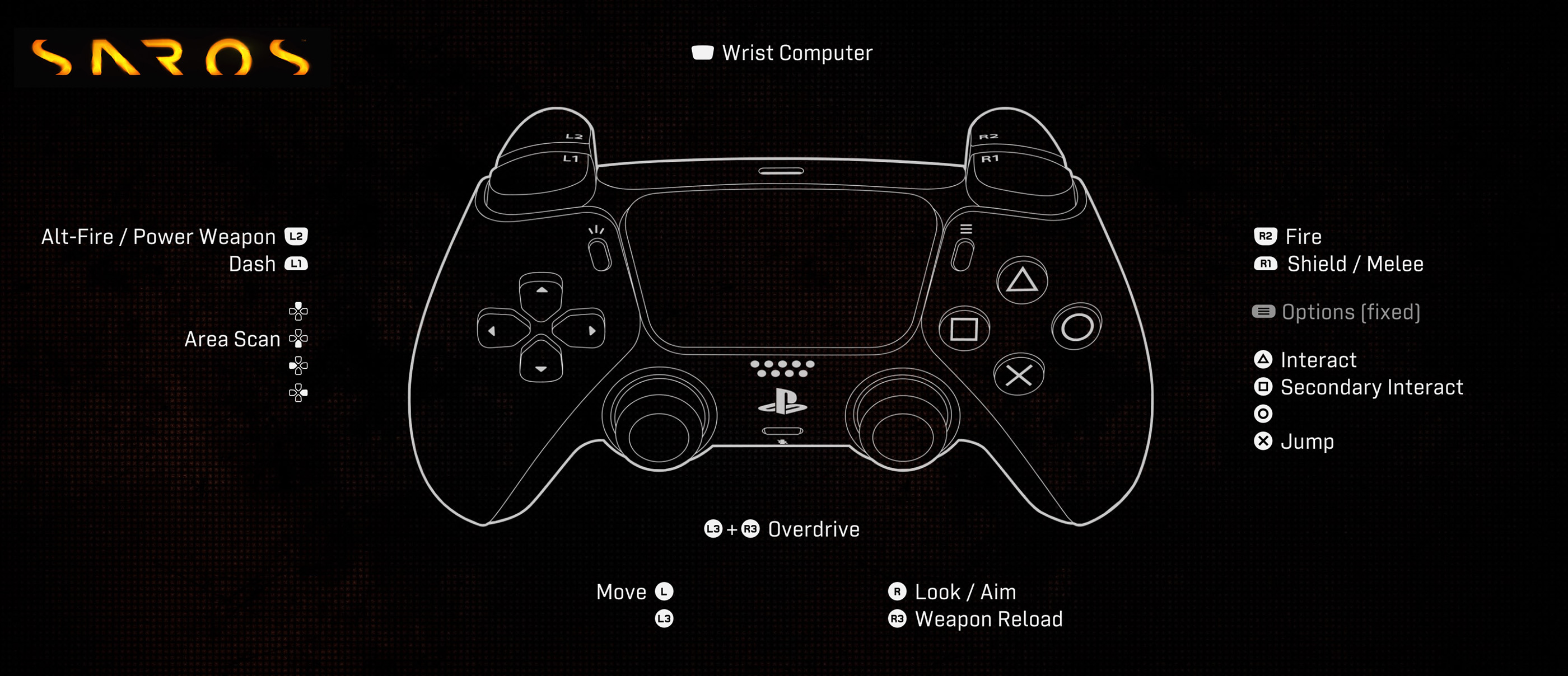
| Action | PlayStation | Xbox |
|---|---|---|
| Move | Left Stick | Left Stick |
| Look / Aim | Right Stick | Right Stick |
| Fire | R2 | RT |
| Alt-Fire | L2 Half Press | LT Half Press |
| Power Weapon | Hold L2 All the Way Down | Hold LT All the Way Down |
| Shield / Melee | R1 | RB |
| Dash | L1 | LB |
| Sprint | Hold L1 Out of Combat | Hold LB Out of Combat |
| Jump | X | A |
| Interact | Triangle | Y |
| Secondary Interact | Square | X |
| Weapon Reload | R3 | RS |
| Overdrive | L3 + R3 | LS + RS |
| Area Scan | D-Pad | D-Pad |
| Wrist Computer | Touchpad | View Button |
| Options / Pause | Options | Menu Button |
Additional Notes
SAROS is designed around the DualSense controller, especially the L2 trigger. A light or half press activates Alt-Fire, while holding L2 all the way down activates the Power Weapon. The game tutorial also confirms that the Power Weapon requires holding L2 fully down, so players who use custom trigger stops or accessibility trigger settings should test their setup carefully.
- L2 / LT has two different functions: half press for Alt-Fire and full hold for Power Weapon.
- R1 / RB handles Shield and Melee, making it one of the most important survival buttons.
- L1 / LB is used for Dash in combat and Sprint outside combat.
- Overdrive is triggered with both stick buttons together: L3 + R3.
- R3 / RS reloads your weapon, so do not confuse it with aiming.
- Area Scan helps you read the environment and should be used whenever an arena or path feels unclear.
- Controls can be reassigned from the controller menu, and the game also includes options to swap L2/R2 buttons and swap sticks.
Check out Tips and Guide for SAROS
Comments
No comments yet. Be the first to share your thoughts!